
Key Takeaways
- An SEO report helps you understand how your website is performing by tracking metrics like traffic, rankings, backlinks, and technical health.
- Clear goals and the right KPIs make your report more meaningful and easier to act on.
- Adding insights, context, and visuals helps readers understand what the data actually means.
- Tools like ViewMetrics let you automate reporting, connect data sources, and create clean dashboards with less effort.
- A focused and regularly shared SEO report keeps your team aligned and supports better long-term decisions.
Creating an SEO report might sound like a technical task, but it’s actually about telling a clear story of how your website is doing. Whether you’re reporting to a client, your boss, or just checking your own progress, a well-structured SEO report helps you understand what’s working and what’s not. In this guide, we’ll walk you through how to build one from scratch and what to include so that your report actually makes sense and leads to useful decisions. Let’s jump right into it.
What Is an SEO Report?
An SEO report is a clear overview of how your website is performing in search engines. It gathers data about your keyword rankings, organic traffic, backlinks, and technical issues. When you look at an SEO report, you get a complete picture of what is working and what is holding your site back. This makes it easier to understand how your SEO efforts are shaping your visibility and reach. It also helps you stay aware of changes in search behaviour so you can keep improving your online presence.
Also read – 17 Best SEO KPIs to Track in 2025
Why You Need an SEO Report?
If you’re running a website, posting blogs, or trying to rank higher in search results, you need to know what’s working and what’s not. That’s where an SEO report comes in. It gives you a clear picture of your progress and helps you make smart decisions moving forward. Whether you’re doing SEO for yourself or showing results to a client, this report keeps everything organised and easy to explain. Here’s why SEO reporting is essential:
- Measure Performance: See how your traffic, keyword rankings, and visibility change over time. Regular tracking helps you understand the impact of your SEO work.
- Show ROI: Use the report to show clients or management what results your SEO strategy is bringing in. It helps build trust and proves that your efforts are paying off.
- Identify Opportunities: Spot new keywords, trending topics, or technical issues that can be fixed to boost performance. These reports often reveal gaps you might have missed.
- Guide Next Steps: Let the data tell you where to focus next. Whether it’s improving content, building backlinks, or fixing site speed, the report gives you direction for your next move.
How To Create an SEO Report?
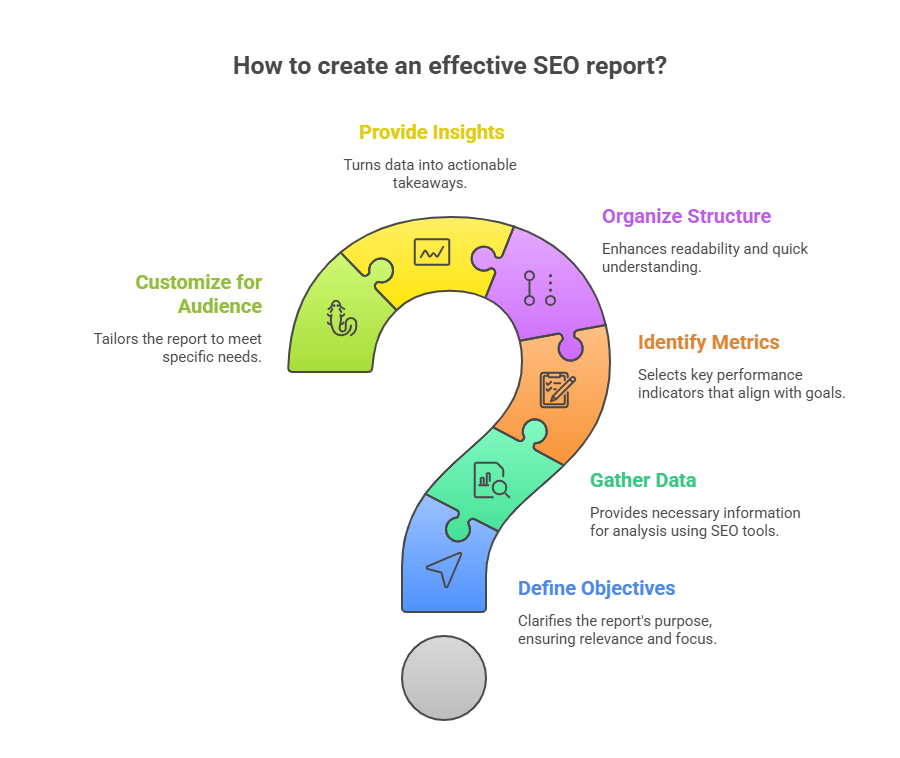
Here’s how you can create an SEO report:
-
Define Your Objectives
Before you start collecting data, make sure you’re clear about what the report is meant to do. Are you tracking progress for a client? Are you checking the results of a campaign? Or are you trying to find areas that need improvement? Defining the objective helps you focus on what matters. It keeps your report relevant and avoids cluttering it with numbers that don’t really add value.
-
Gather Data Using SEO Tools
Once your goal is clear, use SEO tools to pull in the right data. Tools like Google Search Console, Google Analytics, ViewMetrics, SEMrush, or Moz give you detailed information about traffic, rankings, backlinks, and more. Depending on what you’re tracking, you can export the data or connect it directly to your reporting system. Make sure the data is from the right date range and matches your reporting cycle.
Also read – 15 Best SEO Reporting Tools in 2025 for Agencies & Marketers
-
Identify Key Metrics and KPIs
Next, pick the specific metrics that connect with your goal. These could be keyword rankings, organic traffic, bounce rate, CTR, backlinks, or conversions. If you’re working for a client, focus on KPIs that match their business goals. For example, an eCommerce site might care more about organic sales than blog traffic. Picking the right KPIs keeps the report tight and meaningful.
-
Organize Your Report Structure
Structure makes your report easier to read. Start with an overview that highlights what changed or improved. Then break it down into sections like traffic, rankings, technical issues, and backlinks. Use charts, tables, and headers to guide the reader through each part. A well-organized report saves time and helps decision-makers quickly get the insights they need.
-
Provide Insights and Context
Don’t just throw numbers at the reader. Explain what the numbers mean. If traffic dropped, mention why it happened. If rankings improved, point out what might have caused the rise. Insights and context turn raw data into useful takeaways. They also help build trust because you’re showing that you understand the bigger picture.
-
Customize for the Audience
Finally, always keep your audience in mind. A client might want a high-level summary, while a fellow marketer might want to dig into the technical side. Adjust your tone, layout, and level of detail based on who will read the report. The more tailored the report, the more valuable it becomes.
What to Include in an SEO Report?
An SEO report should show progress and point out what needs work. Here’s what you’ll want to cover:
-
Organic Traffic Overview
Start with how much organic traffic the website is getting. This means traffic coming from search engines without ads. Use tools like Google Analytics or Search Console to show trends over time. Look at things like total visits, top-performing pages, bounce rate, and how long people stay on the site. This part helps everyone see if the SEO work is bringing in real results or if something needs to change.
-
Keyword Rankings
Next, show how the target keywords are doing in search results. List down which keywords are ranking, their current positions, and if they’ve moved up or down. It’s also helpful to include new keywords that have started ranking and the ones that dropped. This gives a clear picture of visibility in search and helps plan the next steps in the strategy.
-
Backlink Profile
Include a summary of the website’s backlinks. Talk about how many new backlinks were gained, what domains they’re coming from, and whether they are high-quality. You can also mention lost backlinks. A strong backlink profile helps with search rankings, so this part shows how well the site is doing in building authority.
-
Technical SEO Health
This part covers how well the website functions from a technical perspective. Break it down into simple sections like:
- Website crawlability: Can search engines access and index your pages properly?
- Website speed: Is the site loading quickly on both desktop and mobile?
- Mobile usability: Is the site mobile-friendly and easy to navigate on smaller screens?
- URL structure: Are the URLs clean, readable, and consistent across the site?
- Broken links: Point out any 404s or dead pages that need fixing.
Technical issues often block good content from ranking, so fixing them keeps the site SEO-ready.
-
On-Page SEO Insights
Now focus on individual pages. Look at how well titles, meta descriptions, headers, and content are optimized. You can mention which pages were updated recently and how those changes impacted performance. Include internal linking, keyword usage, and content quality checks. This helps show the direct connection between content updates and search performance.
-
Local SEO Performance
If the business has a physical location or serves a local area, add a section on local SEO. Talk about how the site is showing up in local search results. Include Google Business Profile stats like views, clicks, and customer actions. Track reviews, local pack rankings, and how often the business appears in local searches. This is especially important for stores, clinics, or service providers working in specific regions.
-
SEO Recommendations
End the report with a clear list of what should be done next. These could be fixes, improvements, or new strategies. Prioritize them based on impact and ease. For example, “Fix broken internal links,” “Improve title tags on top 10 pages,” or “Update content on outdated blogs.” This part helps everyone know exactly what to focus on in the next month.
How to Set Up SEO Reporting in ViewMetrics?
If you want a simpler way to track your SEO performance without juggling multiple tools, ViewMetrics can help you bring everything into one clean dashboard. Here’s a step-by-step guide to get your SEO reports up and running.
-
Connect Your SEO Data Sources
Start by linking your tools so that all your SEO numbers show up in one dashboard. ViewMetrics lets you connect tools like:
- Google Search Console to see impressions, keyword clicks, and position changes
- Google Analytics 4 to track how organic visitors behave on your site
- Ahrefs or Semrush to monitor backlinks and keyword trends
Once these sources are connected, ViewMetrics automatically pulls the data and keeps it updated. This means no more manual downloads or switching between tabs.
-
Choose an SEO Report Template
ViewMetrics gives you ready-made templates that show exactly what matters for SEO. You can pick a layout that includes things like:
- Overall traffic from search engines
- Keyword rankings grouped by position
- A summary of backlink growth
- Your website’s technical health score
- On-page performance like title tags and meta descriptions
You can use these templates as they are, or tweak them based on your team’s goals or your client’s needs.
-
Set Automated Report Scheduling
Tired of creating reports every week? You can automate that in just a few clicks. ViewMetrics lets you:
- Schedule SEO reports to go out weekly, monthly, or quarterly
- Email those reports directly to your team or clients
- Add comments or insights alongside the data
- Keep a record of past reports to compare trends
This saves hours of repetitive work and ensures reports are always sent on time without reminders.
-
Customize Dashboards for Clients or Teams
Not everyone needs the same data. With ViewMetrics, you can build dashboards for different stakeholders. For example:
- A content manager may want to focus on keywords and traffic
- A client may care more about conversions and backlinks
- A technical team might want visibility into page speed and site health
You can apply branding too by adding your company’s logo, adjusting the color scheme, and selecting what data gets highlighted first.
-
Track Performance and Insights in Real Time
The best part about using ViewMetrics is that it shows SEO insights as they happen. You get interactive graphs and up-to-date metrics like:
- Keyword positions rising or dropping
- Changes in organic sessions
- Updates to your domain authority
- Technical performance like page load speed
With all this in one place, you can quickly see what’s working and what needs to be fixed. It helps you stay focused and make smart decisions that push your SEO forward.
Best Practices for SEO Reports
-
Make It Visual
When you’re putting together an SEO report, don’t just rely on raw numbers. Add charts, graphs, and visuals that show the trends clearly. Whether it’s traffic growth, keyword rankings, or backlink progress, visuals help the reader spot patterns at a glance. This makes the report easier to understand, especially for clients or team members who are not deep into SEO.
-
Explain What the Data Means
Data without explanation can confuse the reader. Go beyond showing numbers by adding a short explanation of what each trend means. Highlight what changed, why it happened, and what to do next. This makes the report valuable to decision-makers who might not know the technical side of SEO.
-
Keep It Short and Focused
Avoid turning your report into a data dump. Stick to what matters most. Focus on insights that help your team or client make decisions. You don’t need to include every single metric. Highlight what’s working, what’s not, and what to fix. A short, focused report is more likely to be read and actually used.
-
Share Reports on a Regular Schedule
Send your SEO reports on a fixed schedule. Whether it’s monthly or quarterly, stick to a routine. This builds trust, sets expectations, and makes it easier to track long-term progress. Regular reporting also helps spot problems early, so you can act before things get worse.
-
Keep the Spotlight on SEO
It can be tempting to include email stats, paid ads, or social numbers, but try to keep your SEO report focused. That way, you avoid confusion and overlap with broader marketing reports. Sticking to SEO-specific data helps your team clearly see what’s working and what needs attention in the organic space.
Closing Thoughts
Creating an SEO report is all about understanding your website’s story and using that information to make better decisions. When you track the right data, explain what it means, and keep things simple, your report becomes a reliable guide for what to do next. With a structured approach and tools like ViewMetrics, you can stay on top of your SEO performance without getting overwhelmed. Over time, these reports help you see real progress and keep your strategy moving in the right direction.
Frequently Asked Questions (FAQs)
-
How often should I create an SEO report?
Once a month is usually enough for most websites. But if you’re managing a high-traffic site or running campaigns that change quickly, you might want to track things weekly for better control.
-
What’s the difference between an SEO report and a digital marketing report?
An SEO report looks only at your organic search performance. It covers things like rankings, backlinks, traffic, and site health. A digital marketing report is broader and includes SEO along with paid ads, social media, and email performance.
-
What tools should I use to create SEO reports?
Start with Google Search Console and Google Analytics 4. If you want more depth, tools like Ahrefs, Semrush, and Moz are great. For reporting and visualisation, Google Looker Studio and ViewMetrics can help you automate and organise everything nicely.
-
What is the most important metric in an SEO report?
It depends on what you’re trying to achieve. Most people look at organic traffic, keyword rankings, and conversions. Those give you a solid picture of how your SEO efforts are paying off.
-
Can I automate my SEO reports?
Yes, and it saves a lot of time. Tools like ViewMetrics, Looker Studio, and Semrush Reports let you set up automatic reports that pull data in real time. You can schedule them and share them without doing the work each time.
-
Why should I include recommendations in my report?
Reports shouldn’t just show numbers. When you add recommendations, you give direction. It shows you’re not just tracking performance but also thinking ahead and helping the team improve.
-
What’s the difference between an SEO report and an SEO audit?
An SEO audit is a one-time deep check of your entire site. It finds problems, missed chances, and gives you a starting point. An SEO report is something you create regularly to track how you’re doing over time and how those audit fixes are working out.
-
Should I include competitor data in my SEO report?
Yes, you should. Comparing your performance to your competitors can show where you’re falling behind or where you’re winning. It also helps you spot new keywords and backlink strategies worth going after.
Related Posts
-

{ “@context”: “https://schema.org”, “@type”: “BlogPosting”, “mainEntityOfPage”: { “@type”: “WebPage”, “@id”: “https://www.viewmetrics.com/blog/end-of-year-marketing-report” }, “headline”: “How To…
-

{ “@context”: “https://schema.org”, “@type”: “BlogPosting”, “mainEntityOfPage”: { “@type”: “WebPage”, “@id”: “https://www.viewmetrics.com/blog/monthly-marketing-report” }, “headline”: “How To…
-

Creating an analytical report can be a pain most of the time. With the workload…
-

A digital marketing report is more than a collection of numbers; it’s a clear summary…
-

Summary for the Blog Email Marketing Reports provide a comprehensive view of campaign performance by…