
Key Takeaways
- Video marketing KPIs reveal what is truly working, not just surface-level metrics like views or impressions.
- The right video KPIs depend on your goal, whether it is brand awareness, engagement, lead generation, or conversions.
- Different platforms offer different insights, so KPIs should always align with where your videos are published.
- Manual KPI tracking across multiple tools is time-consuming and error-prone, especially for growing teams or agencies.
- Automating video KPI reporting with tools, such as ViewMetrics, makes insights easier to access, share, and act on, helping teams focus on optimization instead of spreadsheets.
Do you manage videos across multiple platforms or clients? If your answer is yes, this article is your goldmine! It helps you understand how to track your video KPIs without turning reporting into a manual task.
Video has become one of the most measurable aspects of digital marketing, yet it is also one of the most misunderstood. Views increase, but leads do not, and the conversions remain flat. This usually happens when you track numbers without fully understanding what those numbers actually mean. Therefore, it’s critical to focus on correct video marketing KPIs.
What are Video Marketing KPIs?
KPIs for video marketing are measurable data points that indicate how your video content is performing in relation to your marketing objectives. Instead of guessing whether a video “worked,” KPIs give you concrete signals around reach, engagement, and results.
At a basic level, video KPIs answer questions like:
- Are people seeing my videos?
- Are they watching past the first few seconds?
- Are they taking action after watching?
When tracked consistently, these metrics help marketers understand what content resonates, what needs improvement, and where budget or effort should be focused next.
Related Article: What Is KPI? Types, Examples & How to Track KPIs Effectively
Why KPIs for Video Marketing Matter?
KPIs turn video performance into something you can actually act on. Without them, videos become isolated assets instead of strategic tools. These are their main benefits:
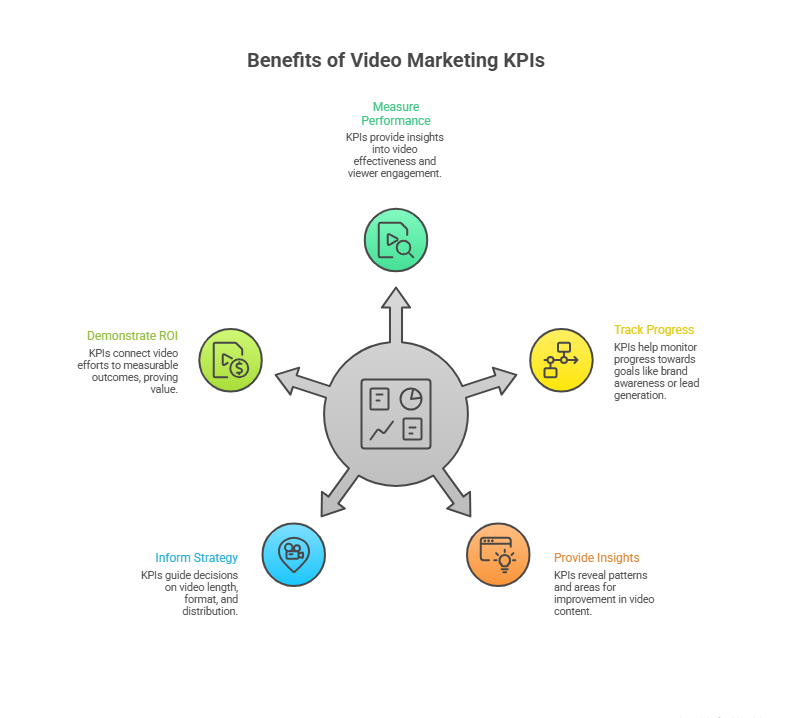
- Measure Performance and Effectiveness
KPIs help you see whether your videos are doing their job. A high view count might look good, but metrics like watch time or conversion rate reveal whether viewers are truly engaged.
- Track Progress and Goals
Clear video KPIs make it easier to see progress over time. Whether your goal is brand awareness or lead generation, consistent tracking shows whether you are moving in the right direction.
- Provide Actionable Insights
Good KPIs highlight patterns. For example, a drop in retention may point to weak intros. Strong engagement but low clicks could signal unclear CTAs.
- Inform Strategy and Optimization
KPIs guide smarter decisions. They help you adjust video length, format, messaging, or distribution channels based on real behavior, not assumptions.
- Demonstrate ROI
For teams reporting to clients or stakeholders, KPIs connect video efforts to measurable outcomes. This is essential for proving value and justifying spend.
Best 18 Video Marketing KPIs to Track in 2026
This list of the 18 most important KPIs for video marketing highlights the metrics that matter most for evaluating performance and optimizing video strategy.
-
Video Views
- What it is: The total number of times people press play on your video, regardless of how long they watch, is your “Video Views.”
- Why it Matters: It’s your broadest measure of reach. If views are high, your content is being noticed. But views alone don’t tell you whether people stayed, engaged, or took action. Think of views as visibility, not value.
- Where to Track: YouTube Analytics, LinkedIn/Meta Insights, Instagram Reels stats, TikTok analytics, and ViewMetrics dashboards.
- How to Use it: Compare views across different topics and formats to see what captures initial interest (but never treat views as the only success measure).
-
Impressions
- What it is: This video KPI indicates the number of times your video’s thumbnail or post appeared on screens, even if someone didn’t click play.
- Why it Matters: Impressions show how often your video was served to an audience. It’s a useful gauge of distribution reach.
- Where to Track: Native analytics on YouTube, Meta, LinkedIn, Twitter/X, and ad dashboards.
- How to Use it: High impressions with low views often highlight weak thumbnails or captions that fail to entice clicks.
-
Unique Viewers/Reach
- What it is: An important KPI for video marketing, indicating the number of individual profiles that saw your video at least once.
- Why it Matters: It removes “double counting.” If the same person watched your video five times, the views count five, but the unique viewers count one. This gives a clearer picture of audience size.
- Where to Track: Platform analytics and ViewMetrics.
- How to Use it: Measure real audience size growth week over week, especially in campaigns focused on awareness.
-
Play Rate
- What it is: The percentage of people who clicked play after seeing your video impression.
- Why it Matters: This measures initial engagement. If a lot of people see your video but few click play, something is wrong with the thumbnail, title, or first-frame hook.
- Where to Track: Analytics on video hosting platforms and landing page video players.
- How to Use it: Use the play rate video KPI to optimize thumbnails, opening seconds, and how compelling the hook is.
-
Follower/Subscriber Growth Rate
- What it is: This KPI for video marketing denotes how fast your community grows as a result of video content
- Why it Matters: Views might show reach, but follower growth reflects long-term interest. If your videos are earning new subscribers consistently, they are likely delivering value.
- Where to Track: YouTube Studio, Instagram/LinkedIn analytics.
- How to Use it: Use this KPI to measure audience-building success over campaigns
-
Average Watch Time
- What it is: How long viewers spend watching your video, on average.
- Why it Matters: Average watch time goes beyond views and tells you whether people are engaged or not. A high average watch time usually signals relevant, well-structured content.
- Where to Track: YouTube Analytics, Vimeo, ViewMetrics.
- How to Use it: A drop in this KPI for video marketing often points to structural issues in content, maybe the intro is too slow, or the value isn’t upfront.
-
Audience Retention Rate
- What it is: The percentage of viewers who keep watching at various points throughout the video.
- Why it Matters: This video marketing KPI shows where people lose interest. The graph of audience retention rate reveals drop-off points and helps you spot the exact moments your content stops resonating.
- Where to Track: YouTube Analytics (very detailed retention curves), ViewMetrics.
- How to Use it: Identify patterns, e.g., if everyone drops off at 10 seconds, your hook might need work.
-
Video Completion Rate (VCR)
- What it is: The percentage of viewers who watch your video from start to finish.
- Why it Matters: Completion means your message was clear enough to follow all the way through. This video KPI is often a stronger signal of engagement than average watch time.
- Where to Track: Platform dashboards and ViewMetrics.
- How to Use it: Compare video completion rates across videos to see which storytelling styles hold attention best.
-
Engagement Rate
- What it is: The ratio of interactions (including the likes, comments, and shares) to total views.
- Why it Matters: Engagement rate reflects active participation, not passive watching. It suggests viewers found your content worth reacting to.
- Where to Track: Social analytics tools, ViewMetrics.
- How to Use it: Use this insightful KPI for video marketing to gauge emotional or intellectual resonance, not just exposure.
-
Social Shares
- What it is: How many times viewers shared your video with others.
- Why it Matters: Social shares amplify reach organically and are one of the strongest signals of perceived value.
- Where to Track: Platform share stats or ViewMetrics reporting.
- How to Use it: The highly shared videos revealed through this video KPI often become reference content or evergreen assets.
-
Comments/Feedback Quality
- What it is: Viewer responses, questions, and discussions in comment sections
- Why it Matters: This is qualitative data. The comments and feedback quality reveal attitude, interest, confusion, and emotional reaction of your TG, which numbers alone can’t.
- Where to Track: YouTube, LinkedIn, Instagram, and other platforms’ comment sections.
- How to Use it: Look for patterns in sentiment and feedback through this video KPI to adjust future scripts or CTAs.
-
Click-Through Rate (CTR)
- What it is: The percentage of viewers who click a link or CTA after watching your video.
- Why it Matters: CTR connects interest to intention. This one is a unique video marketing KPI that tells you whether your video is prompting action or not.
- Where to Track: YouTube Analytics, UTM tracking in Google Analytics, and ad platforms.
- How to Use it: Low CTR with high views often indicates a weak or unclear call to action.
-
Conversion Rate
- What it is: The percentage of viewers who complete a desired action, such as sign-ups, downloads, purchases, or form fills.
- Why it Matters: This is where video moves from branding to business results
- Where to Track: Google Analytics, CRM systems, ViewMetrics linked with UTMs.
- How to Use it: Conversion rate is a highly lucrative KPI for video marketing. With its help, you can link your video content directly to revenue outcomes or lead quality.
-
Leads Generated
- What it is: The number of qualified leads attributed to video content.
- Why it Matters: This video KPI quantifies how much of your pipeline is coming from video touchpoints.
- Where to Track: CRM or lead tracking systems tied back to video campaigns through UTMs.
- How to Use it: Compare the quality and volume of leads from different videos or platforms.
-
Website Traffic From Video
- What it is: Visits to your site that originated from video links or CTAs.
- Why it Matters: This KPI for video marketing shows how well your video content feeds the broader funnel.
- Where to Track: Google Analytics using UTM parameters.
- How to Use it: Use this to see which video topics or platforms drive the most site interest.
-
Return on Investment (ROI)
- What it is: Revenue earned from video activities compared to the cost of producing and promoting them.
- Why it Matters: This video marketing KPI shows the financial value of your video efforts.
- Where to Track: Revenue data paired with cost inputs in analytics tools or dashboards.
- How to Use it: Compare ROI across campaigns to identify the most profitable video types.
-
Cost Per Lead (CPL)
- What it is: The amount you spend, on average, to acquire a lead through video.
- Why it Matters: CPL helps you measure efficiency, especially for paid campaigns.
- Where to Track: Advertising platforms (Facebook Ads, Google Ads) and analytics tools.
- How to Use it: If this video KPI is rising, it signals the need to optimize targeting or creative.
-
Return on Ad Spend (ROAS)
- What it is: The revenue earned for every dollar spent on video advertising.
- Why it Matters: ROAS shows whether your paid video campaigns are delivering profit.
- Where to Track: Ad platforms and unified dashboards like ViewMetrics.
- How to Use it: This one is a measurable KPI for video marketing. Compare ROAS across channels to shift spend where returns are strongest.
How to Ensure That You Focus on the Right Video Marketing KPIs?
Choosing the right video KPIs keeps reporting focused and useful. This is how you do it, step-by-step:
- Define clear campaign goals. Awareness, engagement, and conversions require different metrics.
- Match KPIs to funnel stages. Top-funnel metrics differ from bottom-funnel ones.
- Choose KPIs based on the platform. YouTube KPIs differ from paid social metrics.
- Balance numbers with insights. Combine views with qualitative feedback.
- Set realistic benchmarks. Use past data instead of generic industry averages.
- Focus on actionable metrics. Track what you can actually improve.
- Keep it simple. Too many KPIs dilute focus.
Top 7 Tools to Track KPIs for Video Marketing
Tracking video KPIs manually across platforms can become overwhelming. The tools below help centralize and simplify reporting.
-
ViewMetrics
ViewMetrics automates video KPI reporting across multiple platforms. It pulls data directly into Google Sheets, Slides, and Docs, allowing marketers to create live, branded reports that update automatically. This is especially useful for agencies managing multiple clients or recurring reports.
-
YouTube Analytics
YouTube Analytics provides detailed insights into watch time, retention, and audience behavior. It is essential for tracking organic and paid YouTube performance and YouTube KPIs.
-
Google Analytics
Google Analytics helps connect video engagement to website behavior. It shows how video traffic converts and supports broader funnel analysis.
-
Sprout Social
Sprout Social consolidates video performance across social platforms. It is useful for tracking engagement trends and audience growth in one place.
-
Hootsuite
Hootsuite helps manage and analyze video content across multiple social channels. It is often used for scheduling and high-level reporting.
-
HubSpot
HubSpot connects video metrics with CRM data. This makes it easier to track leads, conversions, and revenue influenced by video.
-
Vimeo
Vimeo offers advanced video analytics, especially for gated or embedded videos used in B2B marketing.
Proven Tips for Improving Video KPIs
Improving KPIs starts with planning and ongoing optimization. Do the following:
- Set clear goals before launching any video.
- Design videos based on funnel stage and audience intent.
- Monitor real viewer behavior, not just surface metrics.
- Test formats, CTAs, and distribution channels regularly.
- Integrate video reporting with broader marketing analytics.
Video performance is not about chasing views. It is about understanding what those views lead to. These 18 video marketing KPIs cover the full spectrum of video performance, from visibility and engagement to business outcomes and efficiency.
<VMCTA1 />
Frequently Asked Questions (FAQs)
-
What is the most important video marketing KPI?
The most important KPI depends on your goal. Awareness campaigns focus on reach and views. Conversion-focused campaigns rely more on CTR and conversion rate.
-
How often should I track video KPIs?
Weekly or monthly reviews work best. Regular tracking helps identify trends early.
-
What is a good average watch time?
A strong benchmark is 50 to 60% of total video length, though this varies by platform.
-
How do I measure ROI for video marketing?
Compare revenue or leads generated from video against production and promotion costs.
-
What’s the difference between view count and engagement rate?
View count measures reach, while engagement rate shows how actively viewers interact.
-
Do video KPIs affect SEO?
Yes. Metrics like watch time and engagement influence visibility on search and video platforms.
Related Posts
-

.h3_marker li::marker { font-size: 20px; font-weight: 600; } .h4_marker li::marker { font-size: 16px; } Key…
-

If you’re not properly measuring how a website is performing, you’re simply guessing what’s working.…
-

You’ve teamed up with an influencer, the content’s live, and the likes are rolling in,…
-

Explore the top KPIs for email marketing to enhance campaign effectiveness. Learn how metrics like…
-

{ “@context”: “https://schema.org”, “@type”: “BlogPosting”, “mainEntityOfPage”: { “@type”: “WebPage”, “@id”: “https://www.viewmetrics.com/blog/digital-marketing-kpis” }, “headline”: “Best Digital…